CSCI351: Internet Programming

Assignment 3.    Due: Feb 27, 2026

Please submit your work to Canvas before 11:59pm of the day above.

  1. (20 points)   Use CSS to layout a table with 3 columns and 2 rows centered on the web page. All cells within a row have to have the same height and the cells within each column have to have the same width. The height of each row has to be set up automatically to fit the cells content. All columns have to have the same width and the table width must be 60% of the browser window width. Shrinking the browser window must lead to redisplaying the table without its content going outside the cells. You are not allowed to use the TABLE tag. Use CSS styling instead. The cells content must be a multiple occurrence of the string "text " (with a space at the end) appeared 20, 10, 30, 40, 10, 50 times within the corresponding cells (counted row-by-row from left to right).

    Name the source file hw3_1.html

  2. (20 points)   Design a CSS menu similar to the one on the instructor's web page with the menu buttons located on one horizontal line with a 15px distance between the buttons. Use no images. Placing the mouse above a menu item must lead to displaying a short description of this item in a paragraph right below the menu line. Clicking on a menu button must lead to loading the corresponding web page to the browser window. Use only CSS to achieve this functionality, no JavaScript or other scripting languages.

    Name the source file hw3_2.html

  3. (20 points)   Fix the layout of the document so that the word "text" would be centered horizontally and vertically. The centering must hold after changing the font size in the Firefox browser by pressing the key combinations Ctrl+ and Ctrl-. The height of the DIV section must be at least 100px. Do not change the initial font size setting of 36px.

    Name the source file hw3_3.html

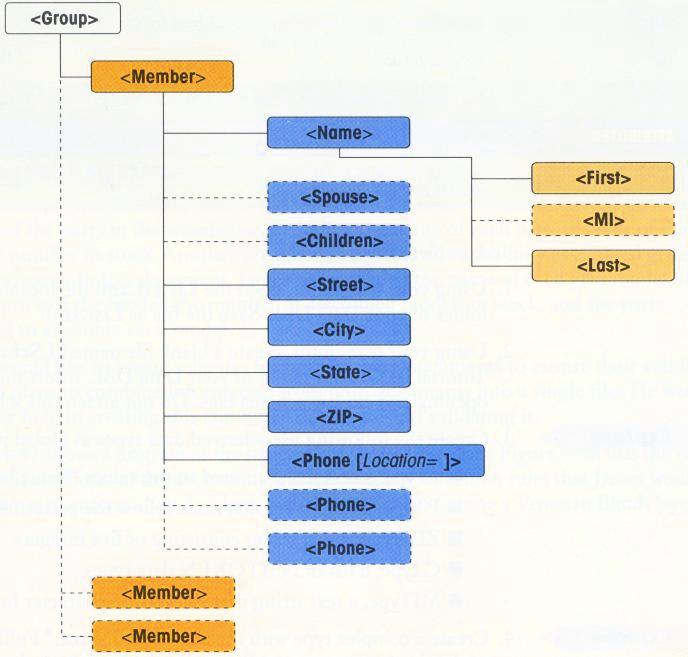
  4. (20 points)   Design an XML document and a DTD for the structure of a group of people that stores the information on its members shown below.
    hw3_4.jpg
    Element Description
    Groupthe root element
    Memberinfo about a class member
    Namemember's name
    Firstfirst name
    MImiddle initial (optional)
    Lastlast name
    Spousemember's spouse name (optional)
    Childrenlist of children (optional)
    Streetstreet address
    Citycity of residence
    ZIPa 5-digit ZIP
    Phonephone number; a member can have or or more of them
    Attribute description
    Locationan optional attribute indicating the type of phone number: home or business

    Put some person's data in your XML document for 3 people and style it on your own test.

    Name the source file hw3_4.xml
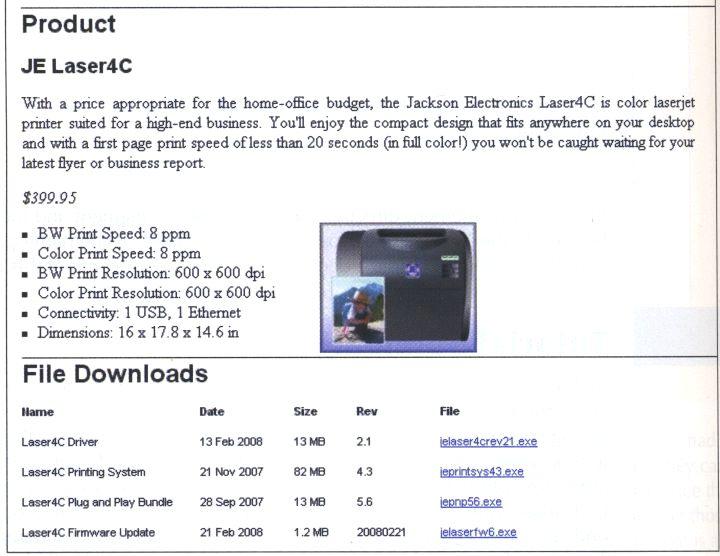
  5. (20 points)   Design a hybrid XML and XHTML document with the following layout:
    hw3_5.jpg

    The XML document must have the root element named Products that provides a description of some computer hardware products. The XML tags of the document corresponding to the headers shown on the above picture must be called productID (in this case JE Laser4C), description, price, features, image, and fileDownloads. Your document must store a description of only one product (the laser printer) shown above. The printer image can be taken here. Make sure to provide a supplying CSS file. The entire document must be put in a frame with a 5px margin from the browser window borders. The products and the file downloads sections must be separated by a horizontal lines with a 20px left margin, as shown above. No DTD specification is required. You do not have to create and upload the linked .exe files for the download.
    Name the source file hw3_5.xml

Make sure that all necessary images and other files are posted on the server.
For this check how your Web page works from the server.