CSCI351: Internet Programming
Assignment 1. Due: Feb 6, 2026
Please submit your work to Canvas before 11:59pm of the day above.
- (30 points)
Your task is to create your own webpage. You must use the table approach
to implement the navigation menu with at least 3 items, and split your content
into multiple files corresponding to the menu links. The files have to be
cross-linked linked together. You may take a look to
instructor's webpage for ideas.
Make sure to use the following stylistic elements in your design:
- Title for each your webpage.
- Body color or background image (your choice) on each page.
- At least 2 different text colors on the main page.
- A header in each document.
- At least 2 paragraphs in each document of your webpage set.
- At least one ordered and one unordered list (per set).
- Some italized and bold face text (per set).
- At least 2 different font sizes, and at least 2 different font families
(per set).
- At least 4 external hyperlinks pointing to the locations of your
own choice (per set).
- At least 2 horizontal rules of different length and width (per
set).
- Your picture on the main page and at least 2 other images per set.
The images must be in GIF, JPEG, or PNG format.
- Your schedule for this semester organized in a
table and at least one other table (per set).
Name the source file hw1_1.html
- (20 points)
Redesign your webpage in task 1 by using frames.
Name the main file hw1_2.html
- (25 points)
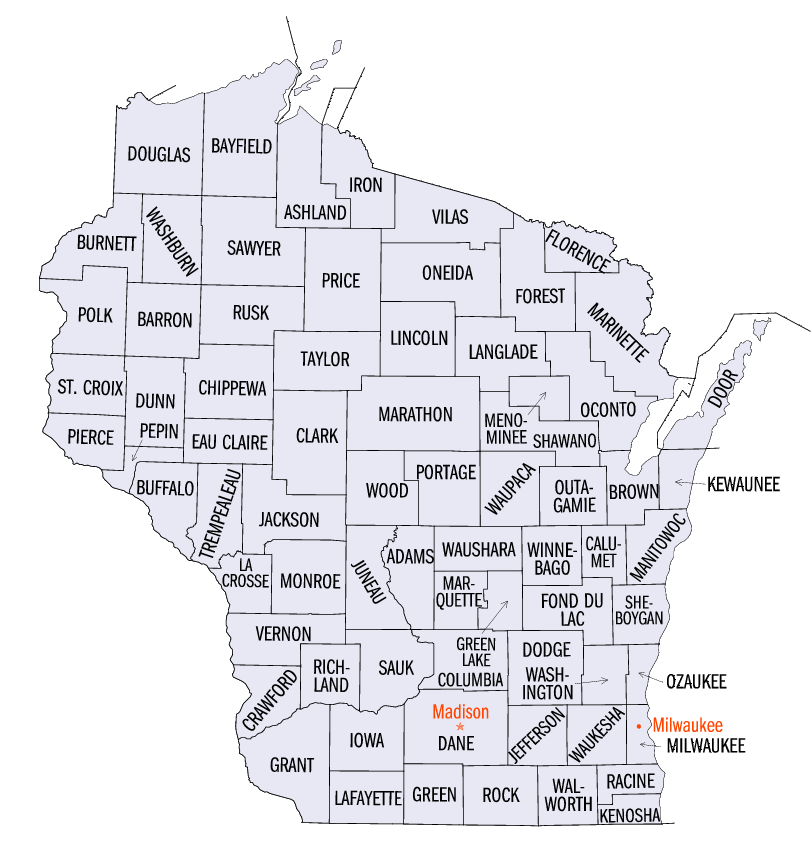
Take the image of Wisconsin map
and use a graphics editor (e.g. Paint) to put in the red color the
geographical locations and names of at least 4 cities on the map, as it is
shown for Madison and Milwaukee.
You can represent the locations by small red circles and use the shown
locations for Madison and Milwaukee. Clicking on any created city location
should open a webpage related to the corresponding city in a
new browser window (find the websites related to the cities on your map by
yourself).
Name the source file hw1_3.html
- (25 points)
Use Paint or other graphics editor to draw a
sketch of your room (or office, or classroom, or garage, or whatever) with
at least 3 objects of different shape (circle, rectangle, polygon) in it.
Make sure to create a graphics file in GIF, JPEG, or PNG format.
Clicking on an object should open a new browser window displaying a short
description of this object.
Name the source file hw1_4.html