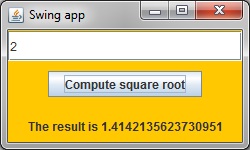
Just enter the number into the input field and press the button to computer the square root.
import javax.swing.*;
import java.awt.*;
import java.awt.event.*;

public class SQRT
{
    public static void main(String[] args)
    {
	SwingApp app = new SwingApp(250, 150);	    // set app window size
	app.setDefaultCloseOperation(JFrame.EXIT_ON_CLOSE);
    }
}

class SwingApp extends JFrame implements ActionListener
{
    private final DrawPanel panel;		    // class variable
    private final JTextField tf;
    private final JLabel res;

    public SwingApp(int width, int height)	    // class constructor
    {
	super();				    // call to super class constructor
	Container pane = super.getContentPane();    // create layout, set colors
	panel = new DrawPanel();		    // add GUI components
	panel.setLayout(new GridLayout(3, 1, 0, 10));  // setup layout
	panel.setBackground(Color.orange);

	tf = new JTextField("Enter a number");
	JButton b = new JButton("Compute square root");
	res = new JLabel("The result is ... ", SwingConstants.CENTER);

	JPanel pan = new JPanel();        // create transparent panel
	pan.setLayout(new FlowLayout(FlowLayout.CENTER, 0, 0));  // setup layout manager
	pan.setBackground(Color.orange);
	panel.add(tf);
	pan.add(b);
	panel.add(pan);
	panel.add(res);

	b.addActionListener(this);
	pane.add(panel);

	Toolkit toolkit = Toolkit.getDefaultToolkit();	// optionally position JFrame
	Dimension screenSize = toolkit.getScreenSize(); // in the middle of the screen
	super.setLocation((screenSize.width - width)/2, (screenSize.height - height)/2);
	super.setTitle("Swing app");		    // set desired window title
	super.setSize(width, height);		    // set desired window size
	super.setVisible(true);
	// add here more code for GUI components
    }

    public void actionPerformed(ActionEvent e)
    {
	String userInput = tf.getText();       // get user input from text field
	double n = Double.parseDouble(userInput);  // parse user input
	double sqrt = Math.sqrt(n);            // compute the square root
	res.setText("The result is " + sqrt);
    }
}

class DrawPanel extends JPanel			    // main window panel
{
    @Override
    public void paintComponent(Graphics g)
    {
	super.paintComponent(g);		    // must be the 1st line
	// add here more code for drawing on panel
    }
}
|